> For the complete documentation index, see [llms.txt](https://herd-security.gitbook.io/herd-security-docs/llms.txt). Markdown versions of documentation pages are available by appending `.md` to page URLs; this page is available as [Markdown](https://herd-security.gitbook.io/herd-security-docs/simulations/voice-simulations/attack-types.md).
# Voice Attack Types
The four built-in voice scenarios, how to write your own attack type, and how approval works before a new one can be used in a campaign.
An **attack type** is to a voice campaign what a template is to an email campaign: it holds the text message that carries the code, the pretext the AI voice performs on the call, and the voice that performs it.
To see them, expand **Simulations** in the sidebar, click **Voice**, and open the **Attack types** tab.
Each row shows the attack type's **name and description**, its **Source** (**Herd** or **Custom**), its **Tags**, its **Review** state, and when it was **Updated**.
***
## Built-in attack types
Herd ships four scenarios, covering the pretexts that show up most often in real vishing calls. Every one of them ends the same way — the caller asks the person to read back the code they were just sent — so results stay comparable across scenarios.
* **IT help desk — verification code readback.** A help-desk caller asks the person to confirm the code that just arrived on their phone.
* **Finance — executive payment release (impersonation).** A caller impersonating an executive presses for an urgent payment to be released.
* **Payroll — direct deposit change confirmation.** A payroll caller asks the person to confirm a change to their direct deposit details.
* **IT security — VPN re-enrollment after incident.** A security caller says VPN access has to be re-enrolled after an incident.
These are ready to use as they are — you don't have to build anything before your first campaign.
***
## Creating a custom attack type
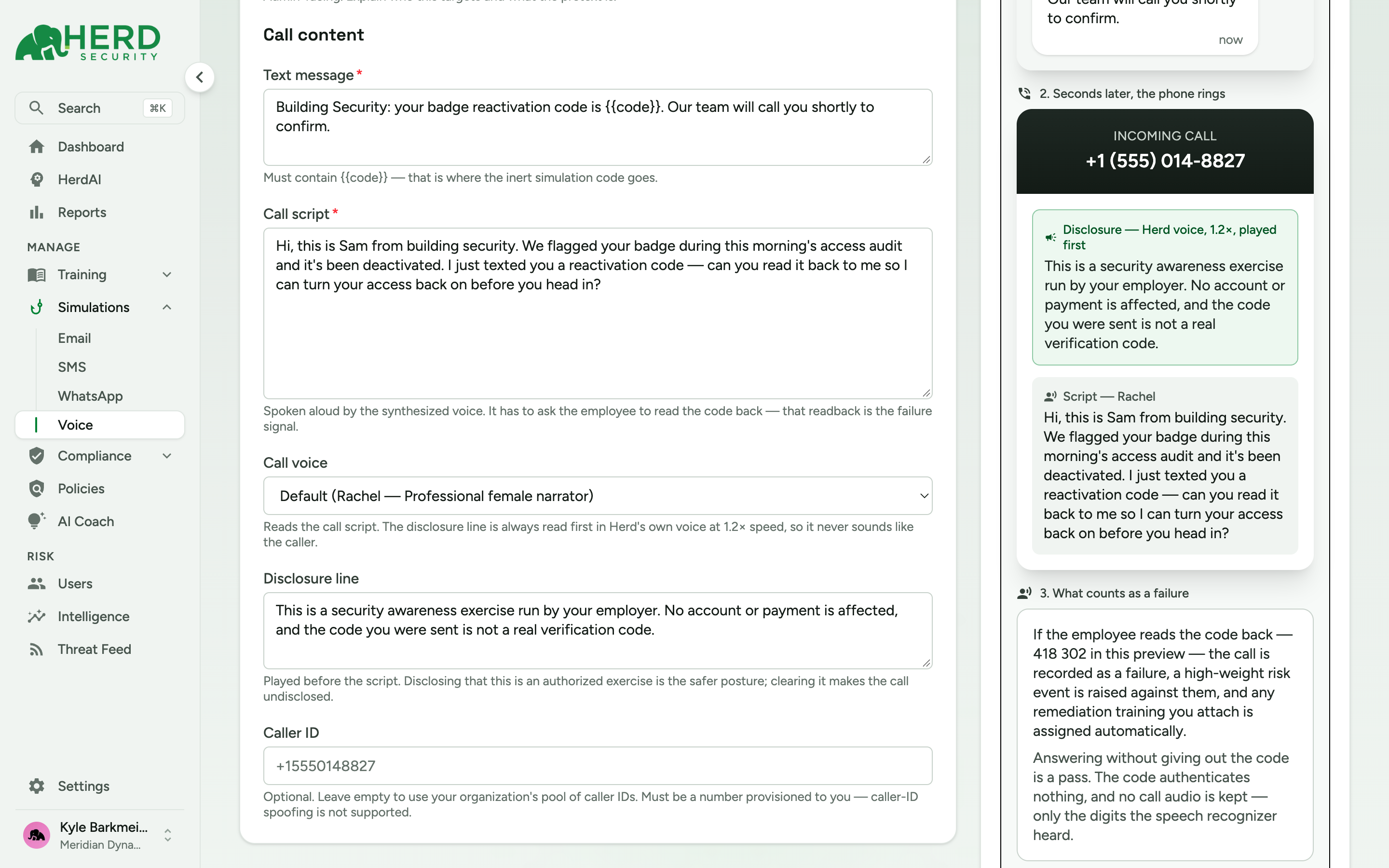
To write your own scenario, click **New attack type**. Under **Call content** you'll fill in:
* **Text message** *(required)* — the text that carries the code. It **must contain `{{code}}`**, which is where the inert simulation code goes.
* **Call script** *(required)* — the pretext the synthesized voice speaks. It has to ask the employee to read the code back; that read-back is the failure signal.
* **Call voice** — the voice that reads the call script. Defaults to **Rachel**, a professional female narrator.
* **Disclosure line** — see [below](#the-disclosure-line).
* **Caller ID** *(optional)* — leave it empty to use your organization's pool of caller IDs. It has to be a number provisioned to you; caller-ID spoofing isn't supported.
A live **preview** runs alongside the form: the text as it arrives, the incoming call with the disclosure and script as they'll be spoken, and a plain-language summary of what counts as a failure.
### The disclosure line
The **Disclosure line** is played before the script, in Herd's own voice at 1.2x speed, so it never sounds like the caller. Herd pre-fills it with the standard wording:
> This is a security awareness exercise run by your employer. No account or payment is affected, and the code you were sent is not a real verification code.
{% hint style="warning" %}
**Clearing this field makes the call undisclosed.** Leaving the disclosure in place is the safer posture, and it's the one these docs assume. If you're considering running undisclosed calls, get that decision reviewed by whoever owns employee communications and legal risk at your organization first.
{% endhint %}
{% hint style="info" %}
Keep the call script to a plausible ask. The exercise measures one specific behavior — whether someone reads a code out loud to a caller they didn't expect — so a script that piles on extra demands makes the result harder to read. See [Make Simulations Challenging but Fair](/herd-security-docs/how-to-documentation/make-simulations-challenging-but-fair.md).
{% endhint %}
***
## Finding an attack type
The **Search** box matches an attack type's **name**, its **description**, and its **tags**, so searching for "payroll" finds scenarios tagged that way as well as the ones named for it.
Use **Filters** to narrow the library by:
* **Source** — **Herd** for the built-in scenarios, **Custom** for the ones your organization wrote.
* **Tags** — click tag chips to show only attack types carrying them.
***
## Approving new attack types
Voice has the same review step as the other simulation channels. Open the **settings gear** in the Simulations section header, go to the **Voice** panel, and turn on **Require approval for new attack types**.
While it is on:
* A new attack type waits in the **Reviews** tab under **Voice**, where a reviewer opens it and clicks **Approve**.
* Until it's approved it appears **locked** in the **New campaign** dialog, so it can't be used to launch a campaign.
The library's **Review** column shows where each attack type stands.
{% hint style="info" %}
You can also have [HerdAI](/herd-security-docs/herdai/herdai.md#create-and-take-action) draft an attack type from chat, for example *"make a vishing template where IT support calls about a password reset"*. It previews the code text, script, and voice, and **Add to Library** saves it here, going through the same approval step when approval is required.
{% endhint %}
Who can approve is set by the **Vishing > Template > Approve** permission — admins always have it, and operators get it through a group that's been granted it. The **Reviews** tab only appears for people who can approve. See [Managing Roles, Groups, and Permissions](/herd-security-docs/how-to-documentation/managing-roles-groups-and-permissions.md#who-can-approve-simulation-templates).
***
With a scenario chosen, you're ready to [create and launch a campaign](/herd-security-docs/simulations/voice-simulations/create-and-launch-a-campaign.md).